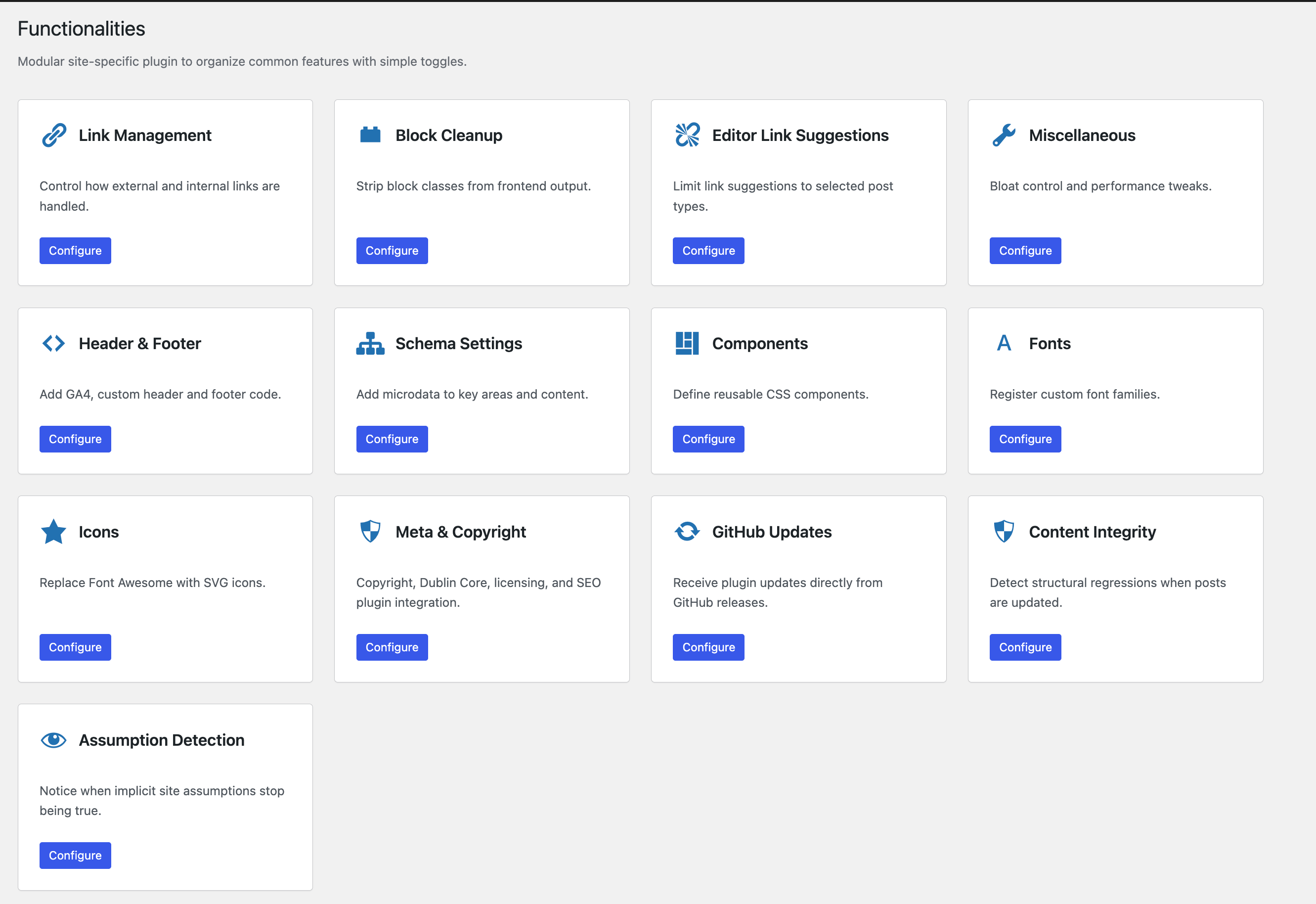
Functionalities
Functionalities: My New Modular WordPress Plugin That Fixes the Stuff I’m Tired of Fixing AND Adds Features that You Didn't Know You Needed.
I’ve built and maintained enough WordPress sites to know the pattern. You start with “just one small tweak.” Then you add another. Then another. Soon you have five plugins for things that should have been one clean, sane toolkit.
I got tired of that mess. So I built my own.
It’s called “Functionalities”. You can check it out at both:
This is a module-based plugin that lets you switch features on or off like Lego blocks. No forced bundles. No “buy the pro version to disable the things we shouldn’t have enabled in the first place.”
What “Functionalities” Is
“Functionalities” is my attempt at a better “site toolkit” plugin. The kind you install once and keep for years. It’s built for people who care about clean output, performance, editor sanity, and SEO details that actually matter.
Most utility plugins either do too little or try to become a full operating system. I wanted the middle path. Practical modules. Tight scope. Strong defaults. Clear docs.
And yes, I built it for me. But I’m shipping it for you.
The Core Idea
Each feature lives inside its own module, and each module can be enabled or disabled independently. That means:
You can run only what you need.
You avoid feature overlap with other plugins.
You keep your dashboard clean.
You reduce the “mystery meat” effect where you don’t know what’s changing your site.
I love this approach because it respects reality. Every site has a different stack. Every site has different baggage.
What Makes It Special
Let me walk you through the modules. Some are “finally, one place for this.” A few are the kind of features I honestly haven’t seen done properly elsewhere.
Link Management
This is one of the modules I’m proudest of because link handling is usually half-baked. Most tools treat it like a checkbox. Real sites are messier than that.
With Link Management, you get:
Complete nofollow implementation
Automatic external link handling
Exception lists (because you will always have exceptions)
Pattern-based domain matching (because rules beat manual cleanup)
If you publish a lot, this saves you from the slow death of auditing links one by one. It’s also safer, because rules are consistent and humans are… well, humans.
Block Cleanup
WordPress blocks output a lot of markup. Some of it is useful. A lot of it is noise. That noise adds up, especially when you’re trying to keep CSS lean and predictable.
Block Cleanup strips unnecessary wp-block-* classes from frontend output so your HTML stays cleaner and your CSS doesn’t turn into a junk drawer.
Less clutter. Less bloat. Fewer weird styling edge cases.
Bloat Control
This module is simple, but it matters. WordPress ships with a bunch of features that many sites never use, and some that actively become liabilities.
Bloat Control helps disable things like:
Emojis
Embeds
XML-RPC
Other unnecessary bits
This is the boring stuff that improves performance and reduces attack surface. I like boring when it makes sites faster. It also allows you to add useful enhancements like PrismJS and fullscreen textareas.
Header & Footer
Every site eventually needs to inject something. Analytics, verification tags, meta, scripts, styles, random client requests you didn’t ask for. You know the pain.
This module includes:
Google Analytics 4 integration
Custom code injection for scripts, styles, and meta tags
It’s clean, predictable, and doesn’t force you to install another plugin that tries to upsell you while you’re just trying to add one tag.
Schema Settings
This one is unique, and it exists because schema is a mess in the real world. Themes output schema. SEO plugins output schema. Sometimes both. Sometimes neither does it right.
Schema Settings adds microdata aimed at improving SEO and rich snippet support. The goal is not “more schema.” The goal is “less broken schema.”
If you’ve ever had that moment where you think your structured data is fine, then Search Console tells you it’s not, you get why I built this.
Components
This is another module I love because it solves a real workflow problem: reusable UI patterns that don’t require a page builder or a giant design system.
Components lets you define reusable CSS components with:
A grid-based UI
Preset components like cards, buttons, badges, and more
A cleaner way to standardize UI across pages without reinventing everything
If you care about consistency, this saves time. If you care about speed, it also reduces the temptation to pile on more CSS “just this once.”
Custom Fonts
Fonts are one of the easiest ways to destroy performance without realizing it. People upload random files, load five weights, and wonder why pages feel heavy.
This module helps you register custom font families with proper @font-face rules, including:
WOFF2 support
Variable fonts
font-displaycontrol
This is the “do it properly” path, without needing to hand-code font stacks every time.
Icon Manager
I’ve seen sites load Font Awesome for three icons. That’s like ordering a moving truck to bring you a toothbrush.
Icon Manager helps replace Font Awesome with SVG sprites so you reduce page weight and keep icons fast.
Cleaner payload. Faster rendering. Less dependency bloat.
Editor Links
This module is Beta and unique, because the editor experience is where WordPress can feel noisy.
Editor Links filters link suggestions inside the block editor for a cleaner experience. If you’ve ever typed in a link search and got a chaotic list of irrelevant stuff, you know why this matters.
It’s a small quality-of-life improvement that makes writing feel smoother.
GitHub Updates
If you ship plugins outside the repo, updates become annoying fast.
GitHub Updates enables automatic updates directly from GitHub releases. That means you can treat releases like releases, not like “download zip, upload zip, hope nothing breaks.”
This is especially useful if you run multiple sites and want a clean deployment routine.
Content Regression Detection
This is where things get spicy.
Most tools tell you if a page is “published.” They don’t tell you if you accidentally broke the content structure while editing. And that’s how regressions sneak in.
Content Regression Detection can alert you when:
Internal links drop sharply after an update
Heading structure breaks (missing H1, multiple H1s)
Word count falls below historical average
I like this module because it catches silent damage. The kind that doesn’t throw an error but still hurts your site over time.
Assumption Detection
This is my favorite “smart but not AI nonsense” module.
Instead of adding more settings, it watches for technical assumptions that quietly break, like:
Schema collisions (theme schema vs SEO plugin schema)
Duplicate analytics scripts
Redundant fonts loading the same family
Inline CSS growing beyond a threshold, turning into performance debt
These issues rarely get noticed until rankings dip, speed scores drop, or the site just feels heavier. I wanted a module that taps you on the shoulder and says: “Hey, something changed. Look here.”
Who This Plugin Is For
If you build one site a year, you might not need this. If you build and maintain sites constantly, it starts to feel like a “why didn’t I have this earlier” tool.
“Functionalities” is for you if:
You hate bloated stacks.
You like modular control.
You love SEO.
You don’t want to pass unnecessary link juice to others.
You care about clean markup and performance.
You want better guardrails for content edits.
You ship work for clients and need consistency.
Basically: it’s for people who don’t want their WordPress setup to turn into a haunted house.
How I Use It
On my own sites, I’ll typically enable:
Link Management (because link hygiene is everything)
Bloat Control (because default WP behavior is not sacred)
Header & Footer (because injection requests never stop)
Custom Fonts and Icon Manager (because performance matters)
Content Regression Detection (because edits can be destructive)
Assumption Detection (because plugins love stepping on each other’s toes)
Then I keep everything else optional based on the site. That’s the point.
Where To Get It
You can learn more and download the plugin from functionalities official website.
And the code lives at https://github.com/wpgaurav/functionalities
If you’re the kind of person who likes reading changelogs and peeking under the hood, you’ll feel at home.
What’s Next
I’m going to keep polishing the modules, tightening UX, and expanding the areas where WordPress tends to “silently fail.” That’s the real theme of this plugin.
Not more features for the sake of it. More protection from the subtle stuff that costs you traffic, speed, and sanity.
If you try it, I’d love to hear what module you ended up enabling first. My bet is Link Management or Assumption Detection. Those two tend to expose problems fast, and WordPress has a talent for hiding problems like a cat hides a dead cockroach.